
追記(2025/10/16)
ついにWindows版Zedが公式リリースされました! https://x.com/zeddotdev/status/1978498543464669543?s=46&t=fyB1I730IzIrDNXSUSk92A
以下からダウンロード可能です。 https://zed.dev/download
特別な理由がない限り、本プロジェクトの利用は必要ありません。
はじめに
最近注目を集めているテキストエディタ「Zed」ですが、Windows版は2024年9月24日現在、正式リリースされていません。そのため、手動でのビルドが必要となっています。 この状況を改善するため、GitHub Actionsを利用して、Zedの日次自動ビルドとインストーラの作成を実現しました。
WindowsでZedを試したいけどビルドがめんどくさい方、ZedをWindowsの標準システムで管理したい方、ぜひご活用ください。 こちらは非公式によるビルドとなっております。ご利用は自己責任でお願いいたします。
Windows版Zedのダウンロード
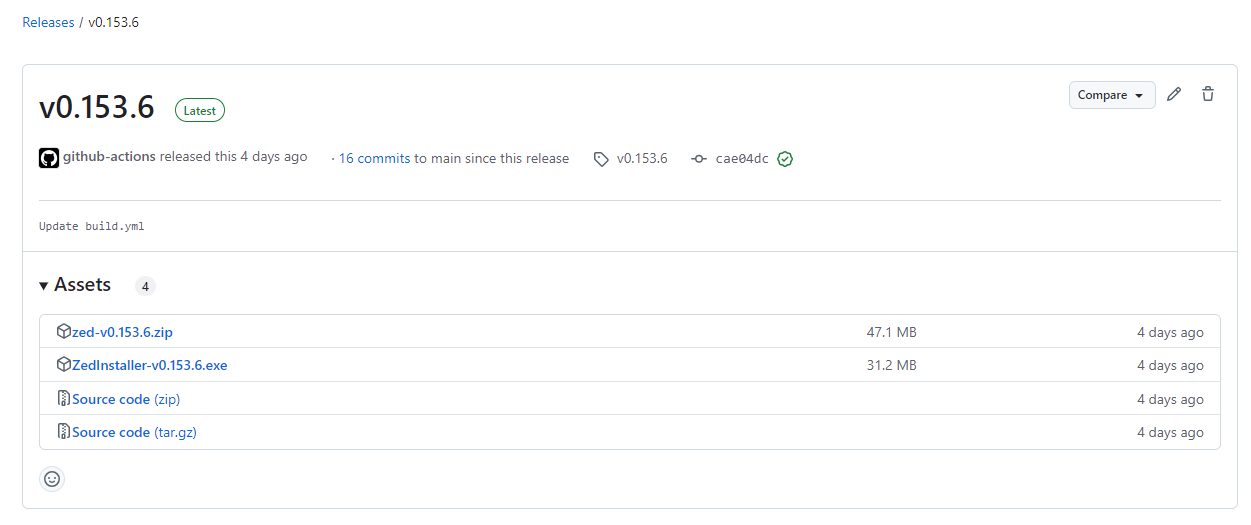
以下、URLからLatest版Zedのダウンロードが可能です。
- ZedInstaller-{バージョン}.exe
- インストーラとなります。インストールウィザードに従って任意の場所にZedをインストール可能です。
- zed-{バージョン}.zip
- zedの単体exeになります。zipを解凍して出てきたexeはそのまま実行可能です。

Github Actionsの内容
以下、作成したActionsの解説となります。Zedの使用には関係ありませんので興味のある方のみお読みください。
自動ビルド用ワークフロー(build.yml)
コードを表示
name: Build Zed Latest Release
on:
  workflow_dispatch:
  schedule:
    - cron: "0 0 * * *" # Runs every night at midnight UTC
  push:
    branches:
      - main

jobs:
  check:
    runs-on: ubuntu-latest
    outputs:
      latest_tag: ${{ steps.get_latest_tag.outputs.latest_tag }}
      proceed: ${{ steps.compare.outputs.proceed }}

    steps:
      - name: Get latest Zed release tag
        id: get_latest_tag
        env:
          GH_TOKEN: ${{ github.token }}
        run: |
          latestTag=$(gh release list -R zed-industries/zed -L 10 --json tagName,isLatest -q '.[] | select(.isLatest == true) | select(.tagName | startswith("v")) | .tagName')
          echo "Latest Zed release tag: $latestTag"
          echo "latest_tag=$latestTag" >> $GITHUB_OUTPUT

      - name: Get our latest release name
        id: get_our_release
        env:
          GH_TOKEN: ${{ github.token }}
        run: |
          ourLatestRelease=$(gh release list -R ${{ github.repository }} -L 10 --json tagName,isLatest -q '.[] | select(.isLatest == true) | select(.tagName | startswith("v")) | .tagName')
          echo "Our latest release: $ourLatestRelease"
          echo "OUR_LATEST_RELEASE=$ourLatestRelease" >> $GITHUB_ENV

      - name: Compare releases
        id: compare
        run: |
          if [ -z "${{ steps.get_latest_tag.outputs.latest_tag }}" ] || [ "${{ env.OUR_LATEST_RELEASE }}" = "${{ steps.get_latest_tag.outputs.latest_tag }}" ]; then
            echo "Our latest release matches Zed's latest tag. Stopping workflow."
            echo "proceed=false" >> $GITHUB_OUTPUT
          else
            echo "Proceeding with build for Zed's latest tag: ${{ steps.get_latest_tag.outputs.latest_tag }}"
            echo "proceed=true" >> $GITHUB_OUTPUT
          fi

  build:
    needs: check
    runs-on: windows-latest
    if: needs.check.outputs.proceed == 'true'

    steps:
      - name: Checkout Zed repository
        uses: actions/checkout@v3
        with:
          repository: zed-industries/zed
          ref: ${{ needs.check.outputs.latest_tag }}
          fetch-depth: 1

      - name: Set up for build
        run: |
          echo "Ready to build ${{ needs.check.outputs.latest_tag }}"

      - name: Install rust nightly
        uses: actions-rs/toolchain@v1
        with:
          toolchain: nightly
          override: true
          target: wasm32-wasi

      - name: Rust Cache
        uses: Swatinem/rust-cache@v2.7.3

      - name: Build release
        uses: actions-rs/cargo@v1
        with:
          command: build
          args: --release

      - name: Archive build
        uses: actions/upload-artifact@v4
        with:
          name: zed-release
          path: target/release/zed.exe

  create_installer:
    needs: [check, build]
    runs-on: windows-latest
    if: needs.check.outputs.proceed == 'true'

    steps:
      - name: Checkout our repository
        uses: actions/checkout@v3

      - name: Download Zed build artifact
        uses: actions/download-artifact@v4
        with:
          name: zed-release
          path: zed-release

      - name: Update Inno Setup script version
        run: |
          $content = Get-Content -Path zed_setup.iss -Raw
          $newContent = $content -replace '#define MyAppVersion ".*"', '#define MyAppVersion "${{ needs.check.outputs.latest_tag }}"'
          $newContent | Set-Content -Path zed_setup.iss -NoNewline

      - name: Compile Setup Wizard
        uses: Minionguyjpro/Inno-Setup-Action@v1.2.2
        with:
          path: zed_setup.iss
          options: /O+

      - name: Upload Inno Setup Installer
        uses: actions/upload-artifact@v4
        with:
          name: zed-installer
          path: Output/ZedInstaller-${{ needs.check.outputs.latest_tag }}.exe

  release:
    needs: [check, build, create_installer]
    runs-on: ubuntu-latest
    permissions:
      contents: write
    if: needs.check.outputs.proceed == 'true'

    steps:
      - name: Download Inno Setup Installer
        uses: actions/download-artifact@v4
        with:
          name: zed-installer
          path: zed-installer

      - name: Download non-installer executable
        uses: actions/download-artifact@v4
        with:
          name: zed-release
          path: zed-release

      - name: Zip the non-installer executable
        run: zip zed-${{ needs.check.outputs.latest_tag }}.zip zed-release/zed.exe

      - name: Upload release artifacts to GitHub Release
        uses: softprops/action-gh-release@v2
        with:
          name: ${{ needs.check.outputs.latest_tag }}
          tag_name: ${{ needs.check.outputs.latest_tag }}
          draft: false
          make_latest: true
          files: |
            zed-installer/ZedInstaller-${{ needs.check.outputs.latest_tag }}.exe
            zed-${{ needs.check.outputs.latest_tag }}.zip
ワークフローの概要
このワークフローは次のジョブで構成されています:
checkジョブ:Zedのリリースページから最新のリリースタグを取得し、自分のリポジトリの最新リリースと比較します。リリースが異なる場合のみ次のジョブが実行されます。buildジョブ:Windows上でZedをビルドします。create_installerジョブ:ビルドされた実行ファイルからWindows用インストーラを作成します。releaseジョブ:ビルドした実行ファイルとインストーラをGitHubのリリースページにアップロードします。
ワークフローファイルの詳細解説
1. トリガー設定
name: Build Zed Latest Release
on:
  workflow_dispatch: # 手動トリガー
  schedule:
    - cron: "0 0 * * *" # 毎晩深夜0時に実行(UTC)
  push:
    branches:
- main # mainブランチへのプッシュ時に実行このワークフローは、毎晩深夜0時にスケジュールされた自動実行と、workflow_dispatchによる手動トリガー、またはmainブランチへのプッシュをトリガーに実行されます。
2. checkジョブ
jobs:
  check:
    runs-on: ubuntu-latest
    outputs:
      latest_tag: ${{ steps.get_latest_tag.outputs.latest_tag }}
      proceed: ${{ steps.compare.outputs.proceed }}
このジョブは、Zedの最新のリリースタグを取得し、自分のリポジトリの最新リリースタグと比較します。
最新タグの取得
      - name: Get latest Zed release tag
        id: get_latest_tag
        env:
          GH_TOKEN: ${{ github.token }}
        run: |
          latestTag=$(gh release list -R zed-industries/zed -L 10 --json tagName,isLatest -q '.[] | select(.isLatest == true) | select(.tagName | startswith("v")) | .tagName')
          echo "Latest Zed release tag: $latestTag"
echo "latest_tag=$latestTag" >> $GITHUB_OUTPUTここでは、Zedのリリースページから最新リリースタグ(vで始まるもの)を取得しています。
自分のリポジトリのリリースタグと比較
      - name: Get our latest release name
        id: get_our_release
        env:
          GH_TOKEN: ${{ github.token }}
        run: |
          ourLatestRelease=$(gh release list -R ${{ github.repository }} -L 10 --json tagName,isLatest -q '.[] | select(.isLatest == true) | select(.tagName | startswith("v")) | .tagName')
          echo "Our latest release: $ourLatestRelease"
          echo "OUR_LATEST_RELEASE=$ourLatestRelease" >> $GITHUB_ENV
gh CLIを使って、自分のリポジトリの最新リリースを取得しています。
      - name: Compare releases
        id: compare
        run: |
          if [ -z "${{ steps.get_latest_tag.outputs.latest_tag }}" ] || [ "${{ env.OUR_LATEST_RELEASE }}" = "${{ steps.get_latest_tag.outputs.latest_tag }}" ]; then
            echo "Our latest release matches Zed's latest tag. Stopping workflow."
            echo "proceed=false" >> $GITHUB_OUTPUT
          else
            echo "Proceeding with build for Zed's latest tag: ${{ steps.get_latest_tag.outputs.latest_tag }}"
            echo "proceed=true" >> $GITHUB_OUTPUT
Zedの最新リリースと、自分のリポジトリの最新リリースが一致している場合は、ワークフローを停止します。一致していない場合のみ、次のビルドジョブが実行されます。
3. buildジョブ
  build:
    needs: check
    runs-on: windows-latest
    if: needs.check.outputs.proceed == 'true'
このジョブは、Zedの最新リリースタグが更新されている場合にのみ、Windows環境でZedをビルドします。
Zedのリポジトリをチェックアウト
      - name: Checkout Zed repository
        uses: actions/checkout@v3
        with:
          repository: zed-industries/zed
          ref: ${{ needs.check.outputs.latest_tag }}
          fetch-depth: 1
Zedのリポジトリを最新タグでチェックアウトします。
Rustのセットアップとビルド
      - name: Install rust nightly
        uses: actions-rs/toolchain@v1
        with:
          toolchain: nightly
          override: true
          target: wasm32-wasi

      - name: Rust Cache
        uses: Swatinem/rust-cache@v2.7.3

      - name: Build release
        uses: actions-rs/cargo@v1
        with:
          command: build
args: --releaseRustのnightlyツールチェーンをセットアップし、ビルドを実行します。ビルドされた成果物(zed.exe)はアーティファクトとしてアップロードされます。
      - name: Archive build
        uses: actions/upload-artifact@v4
        with:
          name: zed-release
          path: target/release/zed.exe
4. create_installerジョブ
このジョブは、Zedのビルド成果物からWindowsインストーラを作成します。
  create_installer:
    needs: [check, build]
    runs-on: windows-latest
    if: needs.check.outputs.proceed == 'true'
Inno Setupスクリプトの更新
      - name: Update Inno Setup script version
        run: |
          $content = Get-Content -Path zed_setup.iss -Raw
          $newContent = $content -replace '#define MyAppVersion ".*"', '#define MyAppVersion "${{ needs.check.outputs.latest_tag }}"'
          $newContent | Set-Content -Path zed_setup.iss -NoNewline
Inno Setupのスクリプト内で、アプリケーションのバージョンを最新リリースタグに置き換えます。
インストーラのコンパイル
      - name: Compile Setup Wizard
        uses: Minionguyjpro/Inno-Setup-Action@v1.2.2
        with:
          path: zed_setup.iss
          options: /O+
Inno Setupを使って、インストーラをコンパイルします。
インストーラのアーティファクトとしてのアップロード
      - name: Upload Inno Setup Installer
        uses: actions/upload-artifact@v4
        with:
          name: zed-installer
          path: Output/ZedInstaller-${{ needs.check.outputs.latest_tag }}.exe
5. releaseジョブ
最後に、ビルドされた成果物とインストーラをGitHubリリースにアップロードします。
  release:
    needs: [check, build, create_installer]
    runs-on: ubuntu-latest
    permissions:
      contents: write
    if: needs.check.outputs.proceed == 'true'
アーティファクトのダウンロードとアップロード
      - name: Download Inno Setup Installer
        uses: actions/download-artifact@v4
        with:
          name: zed-installer
          path: zed-installer

      - name: Download non-installer executable
        uses: actions/download-artifact@v4
        with:
          name: zed-release
          path: zed-release

      - name: Zip the non-installer executable
        run: zip zed-${{ needs.check.outputs.latest_tag }}.zip zed-release/zed.exe

      - name: Upload release artifacts to GitHub Release
        uses: softprops/action-gh-release@v2
        with:
          name: ${{ needs.check.outputs.latest_tag }}
          tag_name: ${{ needs.check.outputs.latest_tag }}
          draft: false
          make_latest: true
          files: |
            zed-installer/ZedInstaller-${{ needs.check.outputs.latest_tag }}.exe
            zed-${{ needs.check.outputs.latest_tag }}.zip
これで、ビルドされた成果物とインストーラがGitHubリリースにアップロードされます。
Inno Setupスクリプトの詳細解説
Inno SetupはWindowsのインストーラを作成するためのOSSです。 以下のようなスクリプトを使用しています。
コードを表示
#define MyAppName "Zed"
#define MyAppVersion "0.0.0"  ; This will be dynamically updated by the workflow
#define MyAppPublisher "Zed Industries"
#define MyAppExeName "zed.exe"

[Setup]
; NOTE: The value of AppId uniquely identifies this application. Do not use the same AppId value in installers for other applications.
; Generate a new GUID for your application using the command [guid]::NewGuid() in PowerShell or an online GUID generator.
AppId={{DEC54CF2-B010-495E-A78B-BD7E1DED610A}
AppName={#MyAppName}
AppVersion={#MyAppVersion}
AppPublisher={#MyAppPublisher}
DefaultDirName={autopf}\{#MyAppName}
DisableProgramGroupPage=yes
OutputBaseFilename=ZedInstaller-{#MyAppVersion}
Compression=lzma
SolidCompression=yes
WizardStyle=modern
UninstallDisplayIcon={app}\{#MyAppExeName}
ChangesAssociations=yes

[Languages]
Name: "english"; MessagesFile: "compiler:Default.isl"

[Tasks]
Name: "desktopicon"; Description: "{cm:CreateDesktopIcon}"; GroupDescription: "{cm:AdditionalIcons}"; Flags: unchecked
Name: "quicklaunchicon"; Description: "{cm:CreateQuickLaunchIcon}"; GroupDescription: "{cm:AdditionalIcons}"; Flags: unchecked; OnlyBelowVersion: 6.1; Check: not IsAdminInstallMode
Name: "associatefiles"; Description: "Associate Zed with all file types"; GroupDescription: "File associations:"; Flags: unchecked

[Files]
Source: "zed-release\zed.exe"; DestDir: "{app}"; Flags: ignoreversion

[Icons]
Name: "{autoprograms}\{#MyAppName}"; Filename: "{app}\{#MyAppExeName}"
Name: "{autodesktop}\{#MyAppName}"; Filename: "{app}\{#MyAppExeName}"; Tasks: desktopicon
Name: "{userappdata}\Microsoft\Internet Explorer\Quick Launch\{#MyAppName}"; Filename: "{app}\{#MyAppExeName}"; Tasks: quicklaunchicon

[Registry]
Root: HKCR; Subkey: "*\shell\{#MyAppName}"; ValueType: string; ValueName: ""; ValueData: "Open with {#MyAppName}"; Flags: uninsdeletekey
Root: HKCR; Subkey: "*\shell\{#MyAppName}\command"; ValueType: string; ValueName: ""; ValueData: """{app}\{#MyAppExeName}"" ""%1"""; Flags: uninsdeletekey
Root: HKCR; Subkey: "Applications\{#MyAppExeName}\shell\open\command"; ValueType: string; ValueName: ""; ValueData: """{app}\{#MyAppExeName}"" ""%1"""; Flags: uninsdeletekey

[Code]
procedure CurStepChanged(CurStep: TSetupStep);
var
  ResultCode: Integer;
begin
  if CurStep = ssPostInstall then
  begin
    if WizardIsTaskSelected('associatefiles') then
    begin
      // Associate Zed with all file types
      Exec(ExpandConstant('{sys}\ftype.exe'), '.=ZedFile', '', SW_HIDE, ewWaitUntilTerminated, ResultCode);
      Exec(ExpandConstant('{sys}\assoc.exe'), '.=ZedFile', '', SW_HIDE, ewWaitUntilTerminated, ResultCode);
    end;
  end;
end;

procedure CurUninstallStepChanged(CurUninstallStep: TUninstallStep);
var
  ResultCode: Integer;
begin
  if CurUninstallStep = usPostUninstall then
  begin
    // Remove desktop icon
    DeleteFile(ExpandConstant('{userdesktop}\{#MyAppName}.lnk'));

    // Remove Quick Launch icon
    DeleteFile(ExpandConstant('{userappdata}\Microsoft\Internet Explorer\Quick Launch\{#MyAppName}.lnk'));

    // Remove file associations
    Exec(ExpandConstant('{sys}\ftype.exe'), 'ZedFile=', '', SW_HIDE, ewWaitUntilTerminated, ResultCode);
    Exec(ExpandConstant('{sys}\assoc.exe'), '.=', '', SW_HIDE, ewWaitUntilTerminated, ResultCode);

    // Clean up registry
    RegDeleteKeyIncludingSubkeys(HKCR, '*\shell\{#MyAppName}');
    RegDeleteKeyIncludingSubkeys(HKCR, 'Applications\{#MyAppExeName}');
  end;
end;特定バージョンビルド用ワークフロー(build-specific-zed-version.yml)
コードを表示
name: Build Specific Zed Version
on:
  workflow_dispatch:
    inputs:
      zed_version:
        description: 'Zed version to build (e.g., v0.100.0)'
        required: true
        type: string

jobs:
  check:
    runs-on: ubuntu-latest
    outputs:
      version_exists: ${{ steps.check_tag.outputs.exists }}
    steps:
      - name: Check if version exists
        id: check_tag
        env:
          GH_TOKEN: ${{ github.token }}
        run: |
          if gh release view ${{ github.event.inputs.zed_version }} --repo zed-industries/zed &> /dev/null; then
            echo "Version ${{ github.event.inputs.zed_version }} exists."
            echo "exists=true" >> $GITHUB_OUTPUT
          else
            echo "Version ${{ github.event.inputs.zed_version }} does not exist."
            echo "exists=false" >> $GITHUB_OUTPUT
          fi

  build:
    needs: check
    runs-on: windows-latest
    if: needs.check.outputs.version_exists == 'true'
    steps:
      - name: Checkout Zed repository
        uses: actions/checkout@v3
        with:
          repository: zed-industries/zed
          ref: ${{ github.event.inputs.zed_version }}
          fetch-depth: 1

      - name: Set up for build
        run: |
          echo "Ready to build ${{ github.event.inputs.zed_version }}"

      - name: Install rust nightly
        uses: actions-rs/toolchain@v1
        with:
          toolchain: nightly
          override: true
          target: wasm32-wasi

      - name: Rust Cache
        uses: Swatinem/rust-cache@v2.7.3

      - name: Build release
        uses: actions-rs/cargo@v1
        with:
          command: build
          args: --release

      - name: Archive build
        uses: actions/upload-artifact@v4
        with:
          name: zed-release
          path: target/release/zed.exe

  create_installer:
    needs: [check, build]
    runs-on: windows-latest

    steps:
      - name: Checkout our repository
        uses: actions/checkout@v3

      - name: Download Zed build artifact
        uses: actions/download-artifact@v4
        with:
          name: zed-release
          path: zed-release

      - name: Update Inno Setup script version
        run: |
          $content = Get-Content -Path zed_setup.iss -Raw
          $newContent = $content -replace '#define MyAppVersion ".*"', '#define MyAppVersion "${{ github.event.inputs.zed_version }}"'
          $newContent | Set-Content -Path zed_setup.iss -NoNewline

      - name: Compile Setup Wizard
        uses: Minionguyjpro/Inno-Setup-Action@v1.2.2
        with:
          path: zed_setup.iss
          options: /O+

      - name: Upload Inno Setup Installer
        uses: actions/upload-artifact@v4
        with:
          name: zed-installer
          path: Output/ZedInstaller-${{ github.event.inputs.zed_version }}.exe

  release:
    needs: [check, build, create_installer]
    runs-on: ubuntu-latest
    permissions:
      contents: write

    steps:
      - name: Download Inno Setup Installer
        uses: actions/download-artifact@v4
        with:
          name: zed-installer
          path: zed-installer

      - name: Download non-installer executable
        uses: actions/download-artifact@v4
        with:
          name: zed-release
          path: zed-release

      - name: Zip the non-installer executable
        run: zip zed-${{ github.event.inputs.zed_version }}.zip zed-release/zed.exe

      - name: Upload release artifacts to GitHub Release
        uses: softprops/action-gh-release@v2
        with:
          name: ${{ github.event.inputs.zed_version }}
          tag_name: ${{ github.event.inputs.zed_version }}
          draft: false
          files: |
            zed-installer/ZedInstaller-${{ github.event.inputs.zed_version }}.exe
            zed-${{ github.event.inputs.zed_version }}.zip
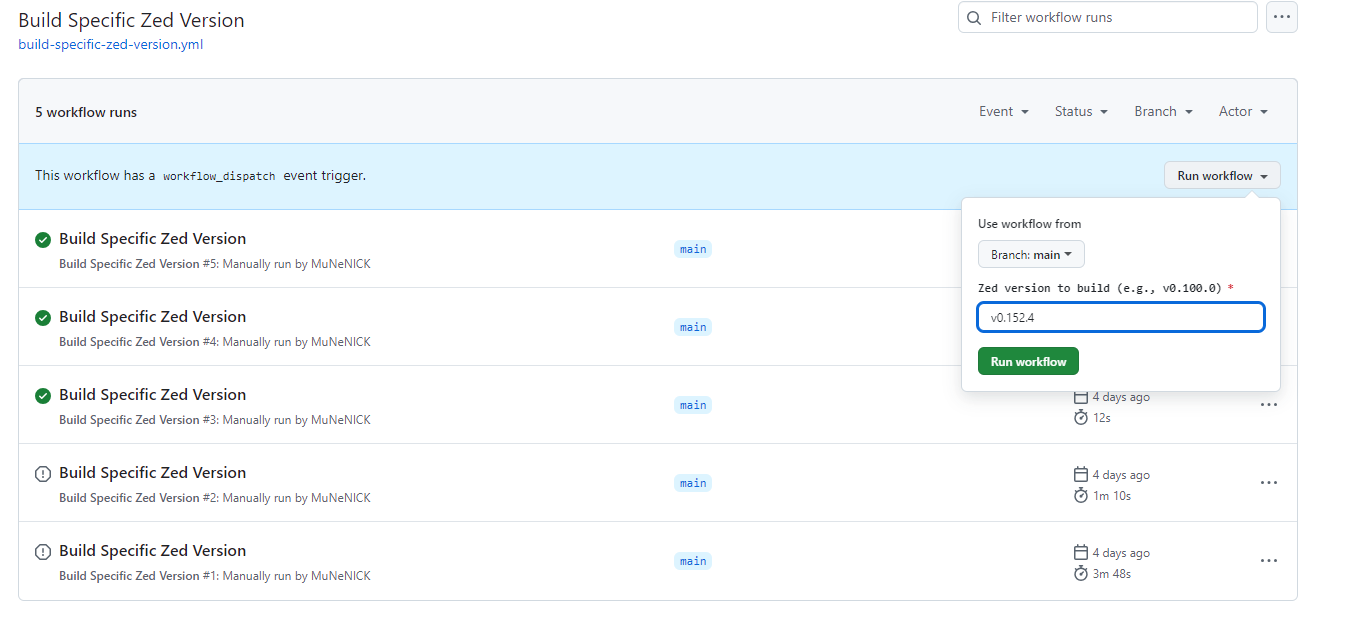
こちらはZedの特定のバージョンを指定し、ビルドするためのワークフローとなります。 Preリリースなどは自動でビルドされないため、こちらのワークフローを使用し、手動でバージョンを指定することでWindows版のビルドが可能となります。
以下、日次ビルド用ワークフローとほぼ内容は同じなので差分のみ解説します。
workflow_dispatchによるバージョン入力
workflow_dispatch:
  inputs:
    zed_version:
      description: 'Zed version to build (e.g., v0.100.0)'
      required: true
      type: string
このワークフローは、手動でトリガーされる際に特定のZedバージョンを入力として受け取ります。ユーザーがトリガー時にzed_version(例: v0.100.0)を指定することで、そのバージョンのビルドが行われます。
おわりに
Github Actionsの勉強がてら上記のスクリプトを作成いたしました。
今回作成したGithub Actionsはフォークしてご自身のリポジトリで使用可能です。
特に特定バージョンのビルドが必要な方はフォークしてBuild Specific Zed Versionのワークフローを実行してください。